Content extraction API
Extract clean content from any web page
Feed your LLM, search index or pipeline the words on a page, not its markup. One call loads the URL in real Chrome, removes cookie dialogs and ads, and returns Markdown, plain text, article fields, links or metadata. Built for teams wiring web pages into AI agents, RAG and data jobs.
200 free calls a monthNo cardSame key as screenshots
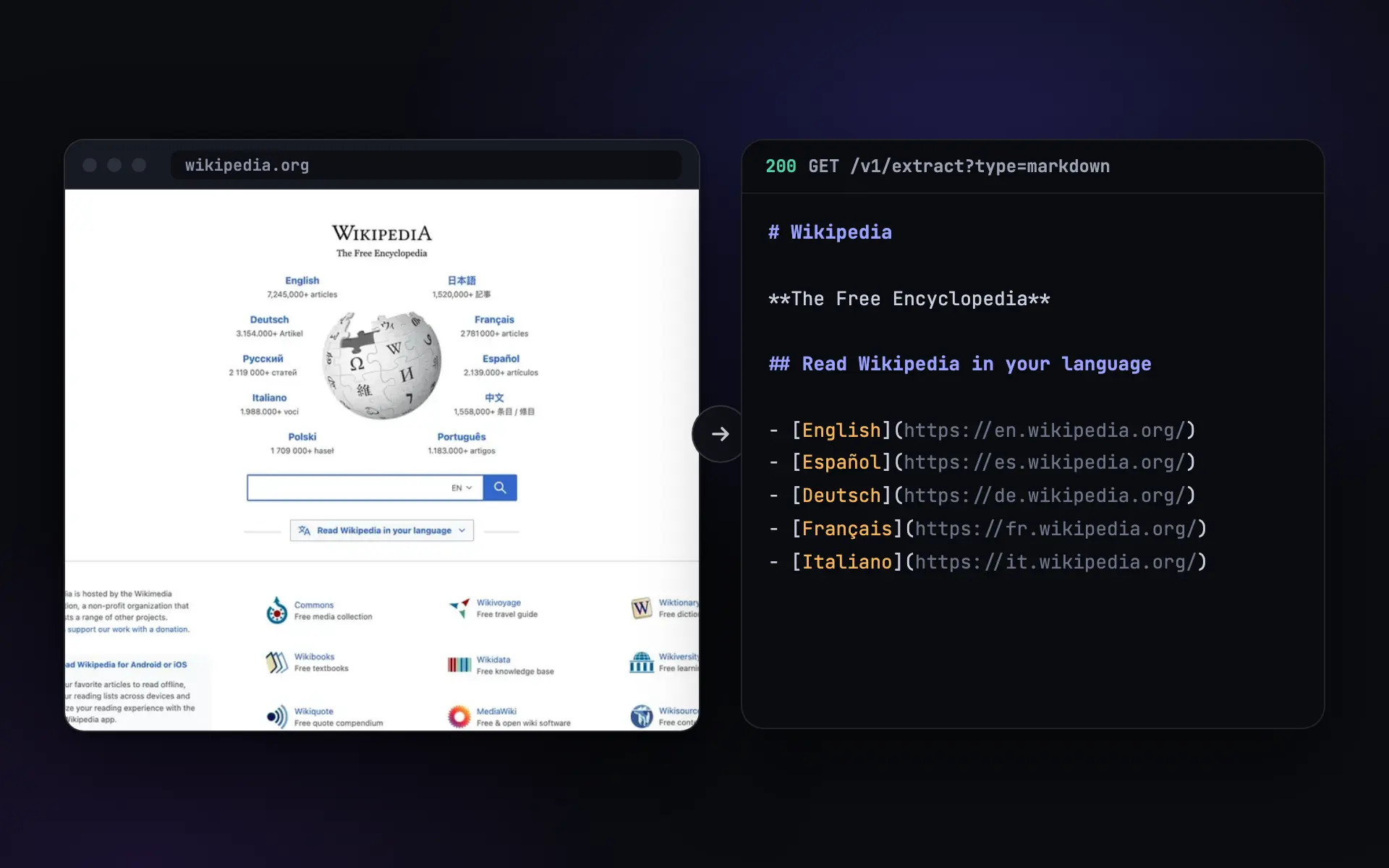
The text you need, without the scraper
Raw HTML is mostly menus, scripts and consent pop-ups. SnapRender hands you the part of the page you actually wanted.
-
Clean input for your LLM
Markdown of the main content, with headings, lists and links kept and navigation, footers, ads and cookie dialogs left out. Your tokens go to the content.
-
Works on JavaScript sites
The page renders in real Chrome before anything is read, so single-page apps return their real text instead of an empty
<div id="root">. -
One call, nothing to maintain
Send a URL, get JSON back. You skip hosting a headless browser and writing a parser for each site, and a redesign does not break your code.
Pick the shape you need
One endpoint, six outputs. Add a CSS selector to read just one part of the page.
| Type | You get |
|---|---|
markdown | The main content as Markdown. The usual choice for prompts, RAG chunks and notes. |
text | Plain visible text, for search indexes, classifiers and diffs. |
article | Title, author, excerpt, content and word count for posts and news. |
metadata | Title, description, canonical URL, Open Graph and Twitter tags, for link cards. |
links | Every link with its anchor text, for crawlers and link audits. |
html | The HTML after scripts ran, when you parse it yourself. |
curl "https://app.snap-render.com/v1/extract?url=https://example.com/blog/post&type=markdown" \
  -H "X-API-Key: sk_live_your_key_here"
import { SnapRender } from 'snaprender';
const snap = new SnapRender({ apiKey: 'sk_live_your_key_here' });
const page = await snap.extract({ url: 'https://example.com/blog/post', type: 'markdown' });
console.log(page.content); // clean Markdown, ready for your promptfrom snaprender import SnapRender
snap = SnapRender(api_key="sk_live_your_key_here")
page = snap.extract("https://example.com/blog/post", type="markdown")
print(page["content"]) # clean Markdown, ready for your prompt{
"url": "https://example.com/blog/post",
"type": "markdown",
"content": "# How we cut build times in half\n\nLast spring our CI ...",
"wordCount": 1184,
"processingTimeMs": 2210
}GET or POST /v1/extract. Full reference: extraction in the docs.
What people use it for
Extraction is the reading half of SnapRender. The same account also captures the page as an image when you need to see it.
-
AI agents that read the web
Give an agent a tool that returns a page as Markdown, plus a screenshot when it needs to look. Works over the hosted MCP server or the REST API.
SnapRender for AI agents -
Pages in Claude, on request
Connect SnapRender to Claude and ask it to read or capture any public page. The extract tool returns the same Markdown as the API.
Connect Claude -
Change detection on the words
Compare the text of a page from one day to the next, so a rotating banner or a new timestamp does not raise a false alarm.
Read the guide -
Link cards from metadata
Read a page's title, description and Open Graph image for your own previews, and capture a screenshot when the image is missing.
Link previews
Screenshots as an API call
Send a GET request, get a PNG back. Ads and cookie banners blocked by default.
200 free renders a month. Paid plans start at $9.
See the page SnapRender sees
Extraction reads the same rendered page that a screenshot captures. Try a capture of your URL here, no sign-up needed.
Your free account then gets 200 calls a month to spend on screenshots, extraction or both.
Try it on your URL
Live capture, no signup. You get the screenshot and the exact API call that produced it.
This is the exact API call that made the image above. Swap in your key and it runs anywhere.
200 renders a month free.
You hit the free demo limit here. The full tool can verify you are human and keep going.
Continue in the full toolQuestions
What can I extract from a page?
Six types: markdown (the main content, readable), text (plain text), html (the rendered HTML), article (title, author, excerpt, content and word count), links (every link with its text) and metadata (title, description, canonical URL, Open Graph and Twitter tags). Add a CSS selector to limit any of them to one part of the page.
Does it work on JavaScript sites?
Yes. Every page is loaded in real Chrome and its scripts run before anything is extracted, so React, Vue, Angular and Next.js pages return their real content, not an empty shell.
What is the difference between markdown and text?
Markdown keeps the structure of the main content (headings, lists, links, emphasis) and leaves out navigation and footers, which suits LLM prompts and RAG chunks. Text is the plain visible text of the page or of your selector, with no formatting.
Can I extract pages behind a login?
Not pages that need a signed-in session: SnapRender does not log in or send your cookies. If the blocker is a firewall on a site you own, Site access in your dashboard sends a secret header your firewall can allow, and extraction uses it too. See Let SnapRender through your firewall.
How long can the output be?
Up to 100,000 characters by default. Raise it with max_length, up to 500,000 characters per call.
How is extraction billed?
Each extraction counts as one render of your monthly quota, the same as a screenshot. The free plan includes 200 a month, and every plan includes extraction.