Works with Claude. Built on Anthropic's MCP standard.

Give Claude eyes
on the web.

Connect SnapRender and Claude captures real website screenshots inside your chat: any URL, any device, dark mode, full page. Then it reads them, compares them, and reports back.

200 free screenshots/month. Works with claude.ai, Claude Desktop, and Claude Code.
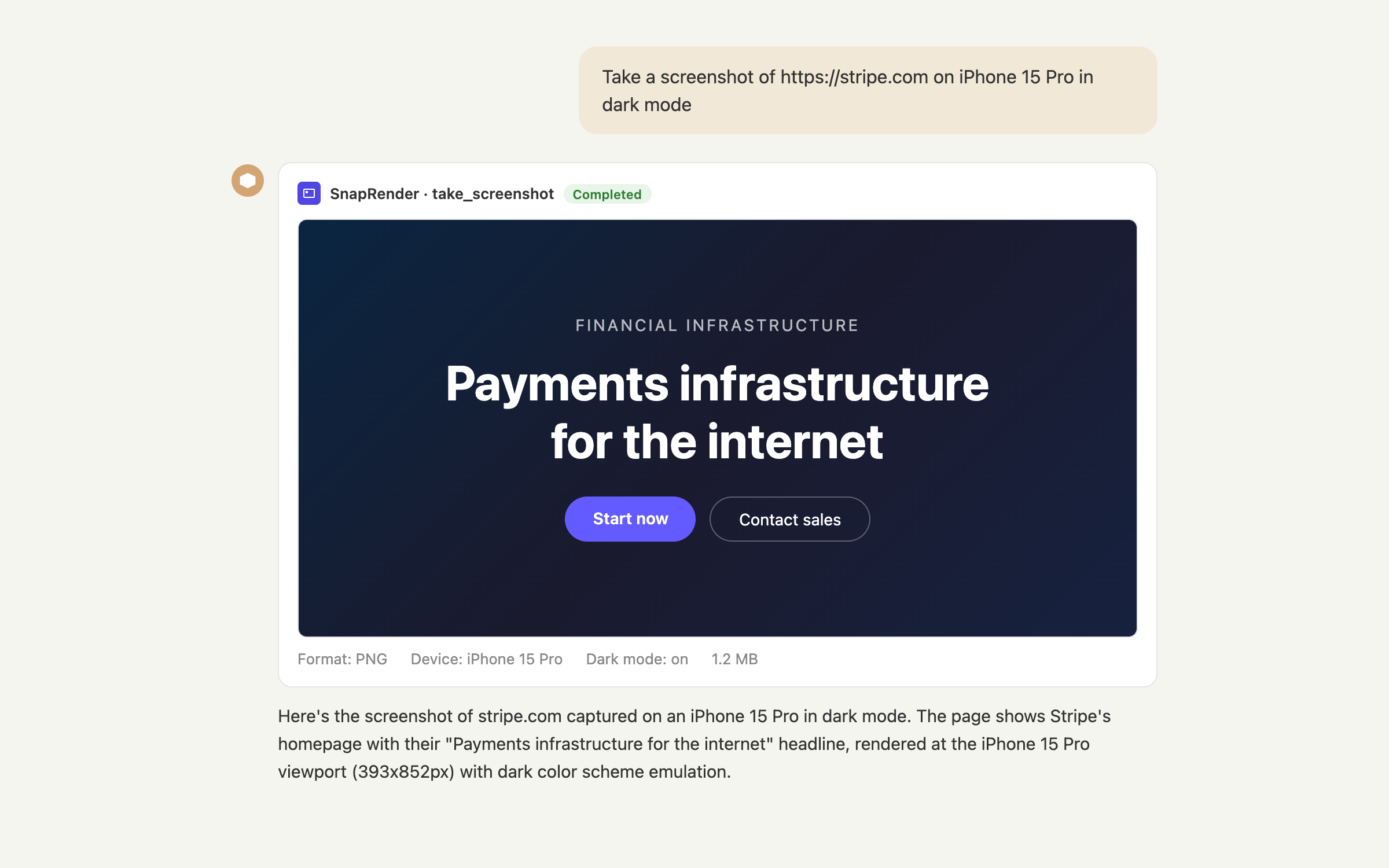
Claude taking a screenshot of stripe.com on iPhone 15 Pro in dark mode using the SnapRender take_screenshot tool

One sentence in, one rendered screenshot out. Claude calls SnapRender's take_screenshot tool with the device and dark mode you asked for.
What Claude can do once it can see

Eleven tools, all callable in plain language. Claude picks the right one and shows its work in the chat.

Visual QA

Compare your site across devices

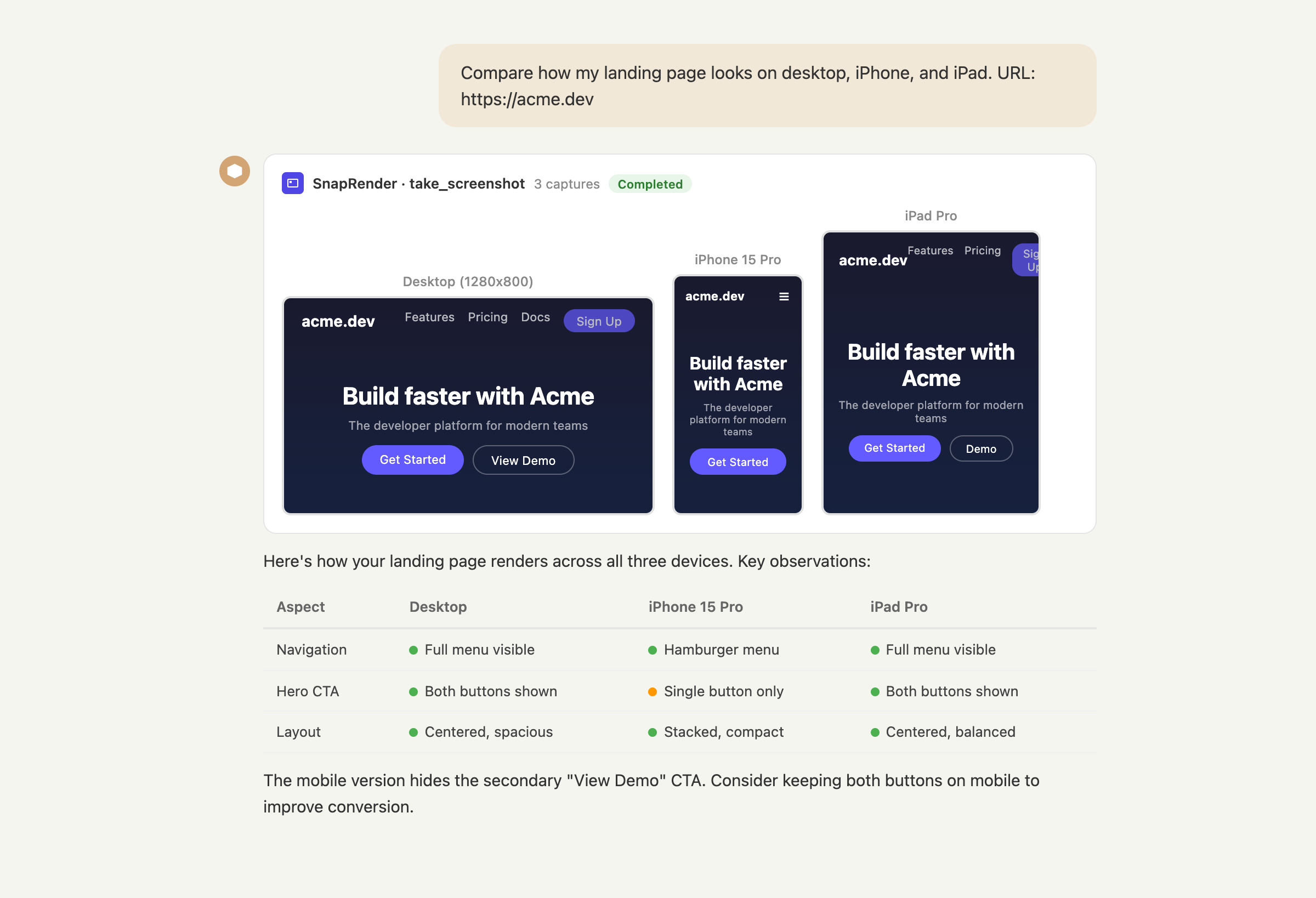
Ask Claude to check your landing page on desktop, iPhone, and iPad. It captures all three with real device emulation, looks at each render, and tells you what breaks: hidden CTAs, cramped layouts, missing nav items.

"Compare how my landing page looks on desktop, iPhone, and iPad. URL: https://acme.dev"

Claude comparing a landing page across desktop, iPhone 15 Pro, and iPad Pro with a findings table
Research

Read any page as clean markdown

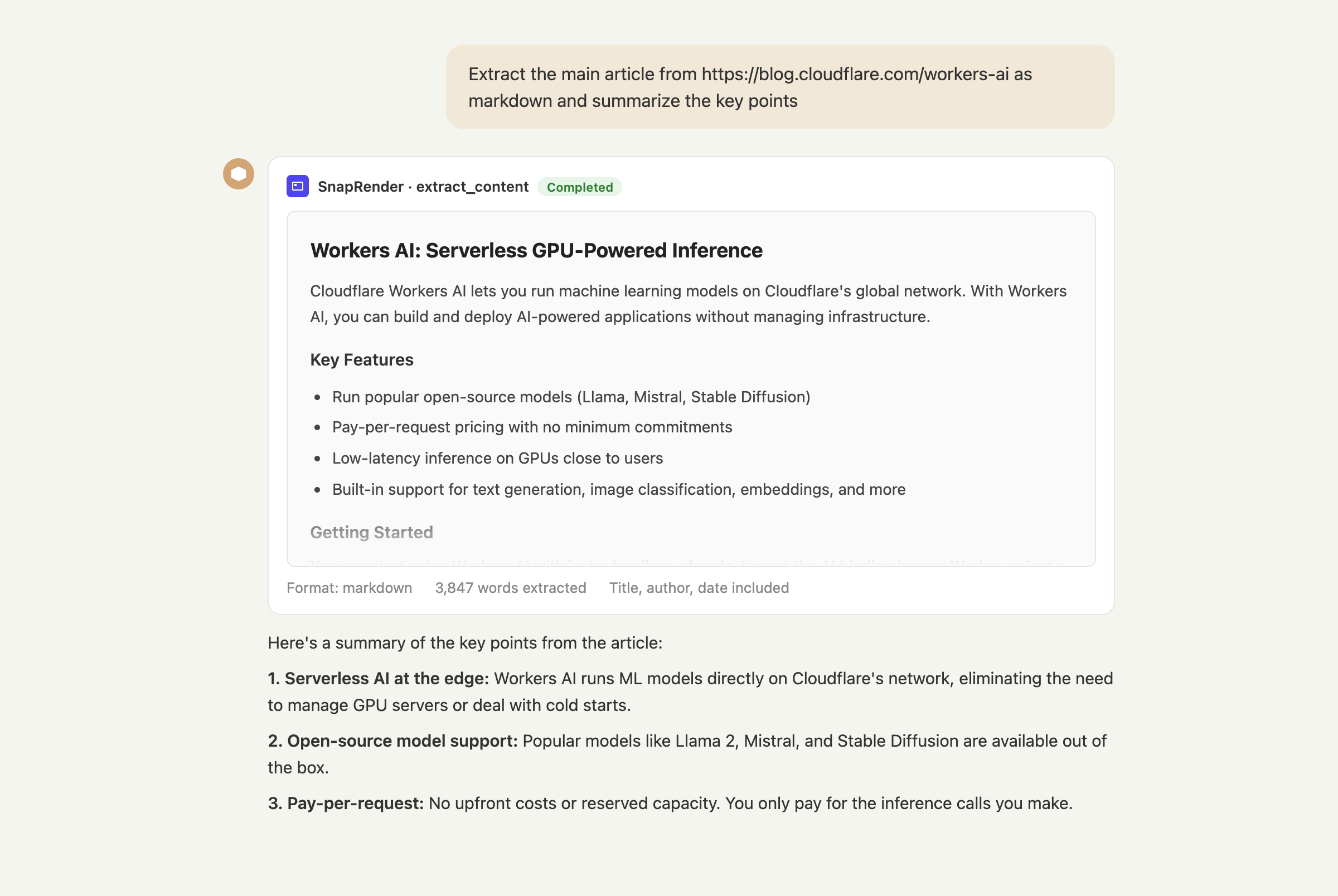
The extract_content tool strips ads, navigation, and cookie banners and hands Claude the article itself. Summaries, comparisons, and quotes come from the actual text, not from a stale index.

"Extract this article and give me the three main arguments with quotes."

Claude extracting an article as clean markdown with the SnapRender extract_content tool
Sharing

Generate shareable screenshot links

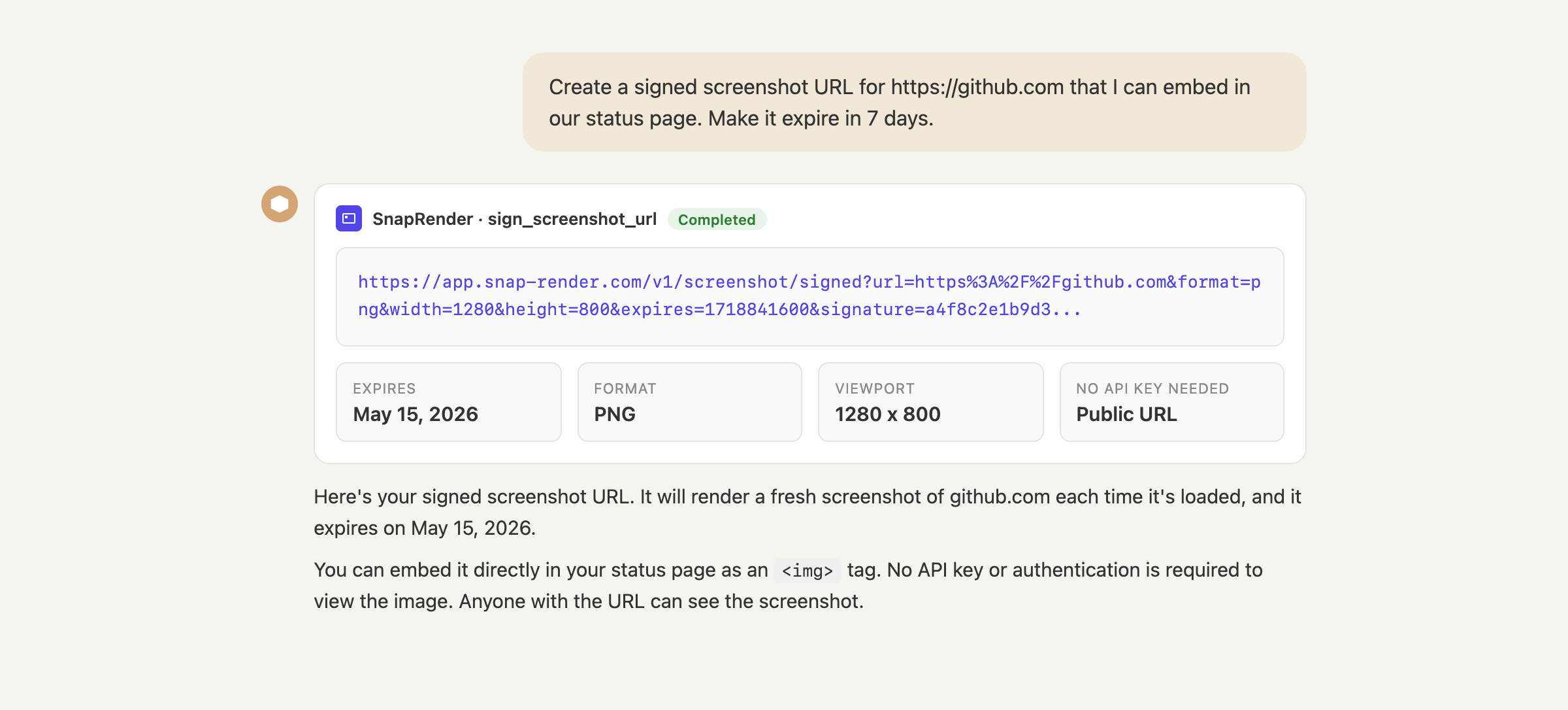
Need a screenshot URL for an email, a doc, or a dashboard? Claude creates a signed link that renders on demand. No file juggling, no expiring uploads to babysit.

"Give me a signed screenshot URL of our pricing page I can embed in the report."

Claude generating a signed screenshot URL with the SnapRender sign_screenshot_url tool
Operations

Check usage and manage webhooks by asking

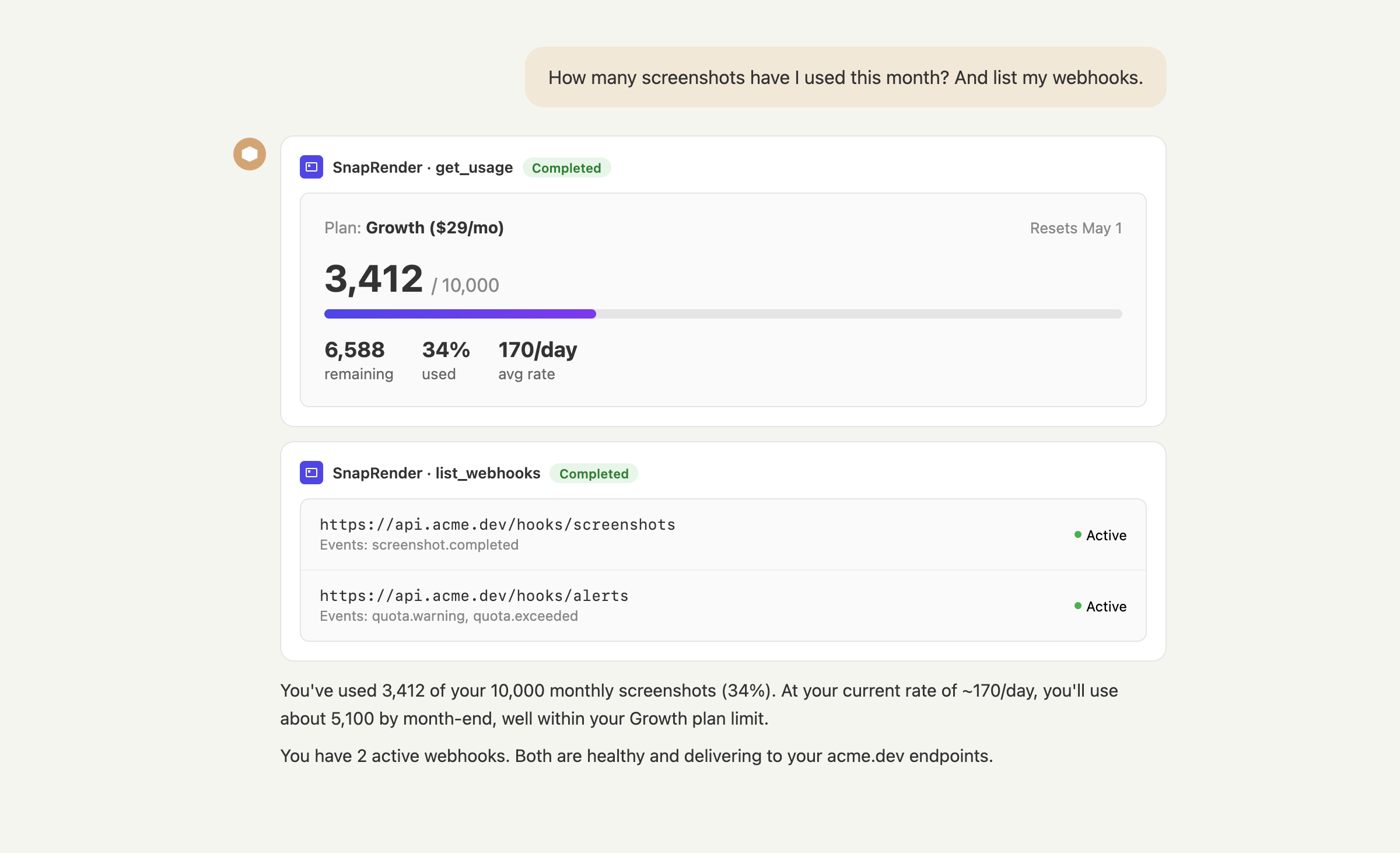
Quota, daily rate, webhook health: Claude reads your account state and answers in context. It can also create, test, and remove webhooks when you ask it to.

"How many screenshots have I used this month? And list my webhooks."

Claude checking SnapRender usage and listing webhooks in a chat

All 11 tools in the connector

take_screenshot extract_content batch_screenshots get_batch_status sign_screenshot_url check_screenshot_cache get_usage create_webhook list_webhooks test_webhook delete_webhook

Granular, single-purpose tools: built to the requirements of Anthropic's connector directory, so Claude always knows exactly what it is allowed to do.

Connect SnapRender to Claude

Three ways in. Pick the one that matches how you use Claude.

1

claude.ai and Claude Desktop (custom connector)

For Claude Pro, Max, Team, and Enterprise plans. No API key to paste: you authorize with your SnapRender login.

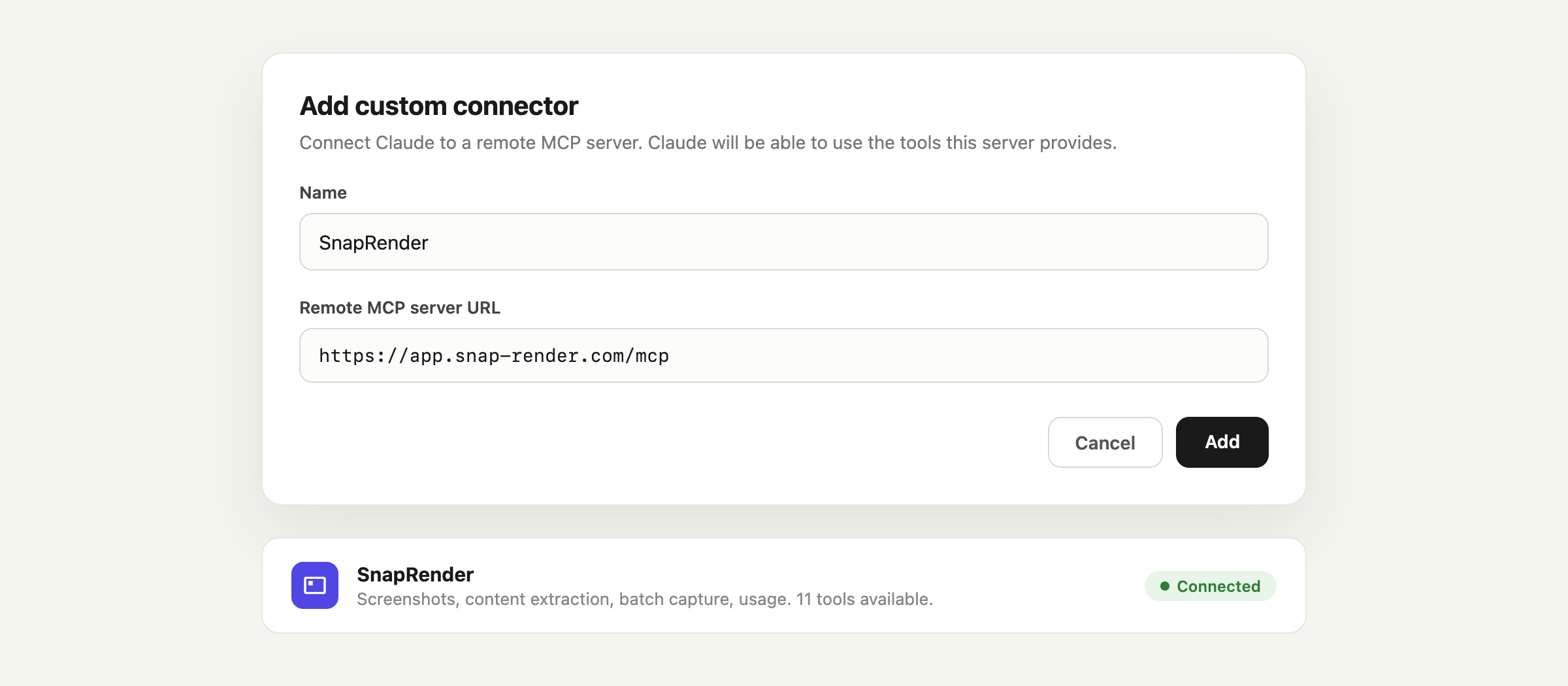
  1. 1Open Settings, then Connectors, and click Add custom connector.
  2. 2Name it SnapRender and paste this URL:
  3. 3Claude opens a SnapRender sign-in window. Log in (or create a free account) and approve. Done: 11 tools appear in your chats.
The Add custom connector dialog in Claude settings with the SnapRender MCP URL filled in, and the connector showing as connected
2

Claude Code (one command)

For the terminal. Grab a key from the dashboard and run:

claude mcp add snaprender \
  --transport streamable-http \
  https://app.snap-render.com/mcp \
  -H "Authorization: Bearer sk_live_your_key_here"

Now your coding agent can screenshot the app it is building, compare staging against production, or capture a competitor's page for reference, all without leaving the terminal.

3

Local MCP server (any plan, any client)

On the free Claude plan, or using Cursor, Windsurf, or another MCP client? Run the server locally from npm:

{
  "mcpServers": {
    "snaprender": {
      "command": "npx",
      "args": ["snaprender-mcp"],
      "env": { "SNAPRENDER_API_KEY": "sk_live_your_key_here" }
    }
  }
}

Add this to claude_desktop_config.json (or your client's MCP config). Same tools, running on your machine. Package: snaprender-mcp on npm.

New to connectors? Anthropic explains how they work in the Claude Help Center. The protocol underneath is the open Model Context Protocol.

Prompts to try on day one

Copy one, swap in your URL, and paste it into Claude. Naming SnapRender in the prompt makes Claude reach for the connector right away.

Use SnapRender to take a full-page screenshot of https://yoursite.com in dark mode. Then look at the result and list anything that seems broken, cut off, or unreadable.
Use SnapRender to screenshot these pricing pages: [paste 3 to 5 URLs]. Build a table comparing their plans, prices, and trial offers.
Use SnapRender's take_screenshot tool to capture https://yoursite.com on desktop, on iphone_15_pro, and on ipad_pro. Compare the three renders and tell me what to fix first.
Use SnapRender's extract_content tool on [article URL] and summarize the three strongest arguments with direct quotes.
Use SnapRender's batch_screenshots tool to capture all of these URLs as full-page screenshots: [paste list]. Then check the batch status and report when every capture is done.
Use SnapRender's get_usage tool and tell me how many screenshots I have left this month and my average daily usage.

Built for Claude, not bolted on

Most screenshot APIs added an MCP wrapper as an afterthought. This connector was engineered against Anthropic's own requirements: OAuth 2.0 sign-in, granular tools, a hosted endpoint with nothing to install.

Real Chrome, not a toy renderer

JavaScript executed, web fonts loaded, lazy content scrolled in. Claude sees exactly the page your users see, so its conclusions are worth acting on.

No consent-popup hallucinations

Ads and cookie walls are stripped before Claude ever looks. No tokens burned describing a banner, no analysis of a page that is 60% overlay.

Engineered to Anthropic's bar

OAuth 2.0 authorization and 11 single-purpose tools, built to the Connectors Directory requirements from day one. Directory review is in progress.

The whole toolbox, one approval

Screenshots, content extraction, batch jobs, signed URLs, webhooks, usage. Authorize once and Claude can run an entire monitoring workflow.

Wired up tonight, free

200 screenshots a month on the free plan, every feature included, no credit card. If Claude earns its keep, paid plans start at $9.

You hold the keys

Scoped OAuth access, revocable in one click from your dashboard. SnapRender never sees your conversations, only the URLs you ask it to capture.

Quick reference

Everything an engineer (or an AI assistant) needs to evaluate the connector, in one table.

Connector typeRemote MCP server, Streamable HTTP transport. Hosted: nothing to install.
Endpointhttps://app.snap-render.com/mcp
AuthenticationOAuth 2.0 with PKCE (claude.ai and Claude Desktop sign-in flow) or API key via Authorization: Bearer header (Claude Code, Cursor, Windsurf, any MCP client)
Tools (11)take_screenshot, extract_content, batch_screenshots, get_batch_status, sign_screenshot_url, check_screenshot_cache, get_usage, create_webhook, list_webhooks, test_webhook, delete_webhook
RenderingReal Chrome. PNG, JPEG, WebP, PDF. Full page, custom viewports, device emulation presets, dark mode, ad and cookie banner blocking on by default, optional caching.
Local alternativenpx snaprender-mcp (npm package, same 11 tools, SNAPRENDER_API_KEY env var). Works on the free Claude plan in Claude Desktop.
Claude requirementsCustom connectors need Claude Pro, Max, Team, or Enterprise. Claude Code and the local MCP server work on any plan.
SnapRender pricingFree: 200 screenshots/month, no credit card. Paid from $9/month (2,000) to $199/month (200,000).
StatusLive in production. Built to Anthropic Connectors Directory requirements; directory listing under review. Works today as a custom connector.
MoreAPI docs, OpenAPI spec, llms.txt, all AI connectors

Claude connector FAQ

Can Claude take screenshots of websites?+

Not by itself: Claude has no browser. With the SnapRender connector, Claude calls a real Chrome instance through Anthropic's Model Context Protocol and gets the finished screenshot back in the chat. You ask in plain language, for example: take a screenshot of stripe.com on iPhone 15 Pro in dark mode, and Claude captures it, looks at it, and discusses it with you.

How do I connect SnapRender to claude.ai?+

Open Settings, then Connectors, click Add custom connector, and paste https://app.snap-render.com/mcp. Claude opens a SnapRender sign-in window where you authorize access with OAuth. No API key to copy. The whole flow takes seconds.

Do I need a paid Claude plan to use the connector?+

Custom connectors on claude.ai require a Claude Pro, Max, Team, or Enterprise plan. If you are on the free Claude plan, you can still use SnapRender through Claude Code, or run the local MCP server from npm in Claude Desktop. The SnapRender side is free either way: 200 screenshots per month, no credit card.

Is SnapRender in the Anthropic Connectors Directory?+

The connector was built to the directory's technical requirements, including OAuth 2.0 authorization and granular per-action tools, and the listing is under review with Anthropic. You do not need to wait for the directory: adding it as a custom connector works today and takes seconds.

What can Claude do with the SnapRender connector?+

The connector exposes 11 tools: capture screenshots with full device emulation and dark mode, check the cache, create signed screenshot URLs, extract page content as clean markdown, start and monitor batch jobs across many URLs, manage webhooks, and check your plan usage. Ads and cookie banners are blocked by default, so Claude sees clean pages.

Is it safe to connect Claude to SnapRender?+

The connector only exposes SnapRender's own tools: it can capture public web pages and read your SnapRender usage data, nothing else. Authorization uses OAuth 2.0 scoped to your account, you can revoke it any time from the dashboard, and the rendering service blocks requests to private networks. Your conversations never pass through SnapRender; only the URLs you ask to capture do.

Using a different agent?

The same API powers connectors for ChatGPT, LangChain, CrewAI, AutoGen, and n8n.

Your Claude is seconds away from seeing the web

Create a free account, paste one URL into Claude's connector settings, and start asking it to look at things.